Packet Replay
Packet replay plays a capture back on the network graph one packet at a time: each packet flies along its conversation’s edge, from sender to receiver, in its protocol’s colour, and a ring opens where it lands. Where the Network Traffic Over Time slides a window over conversations, replay shows the individual packets inside them.
Turn it on from the time axis’s settings (the sliders button on its bar): Play by › Packet by packet. Choose Time window there to go back.
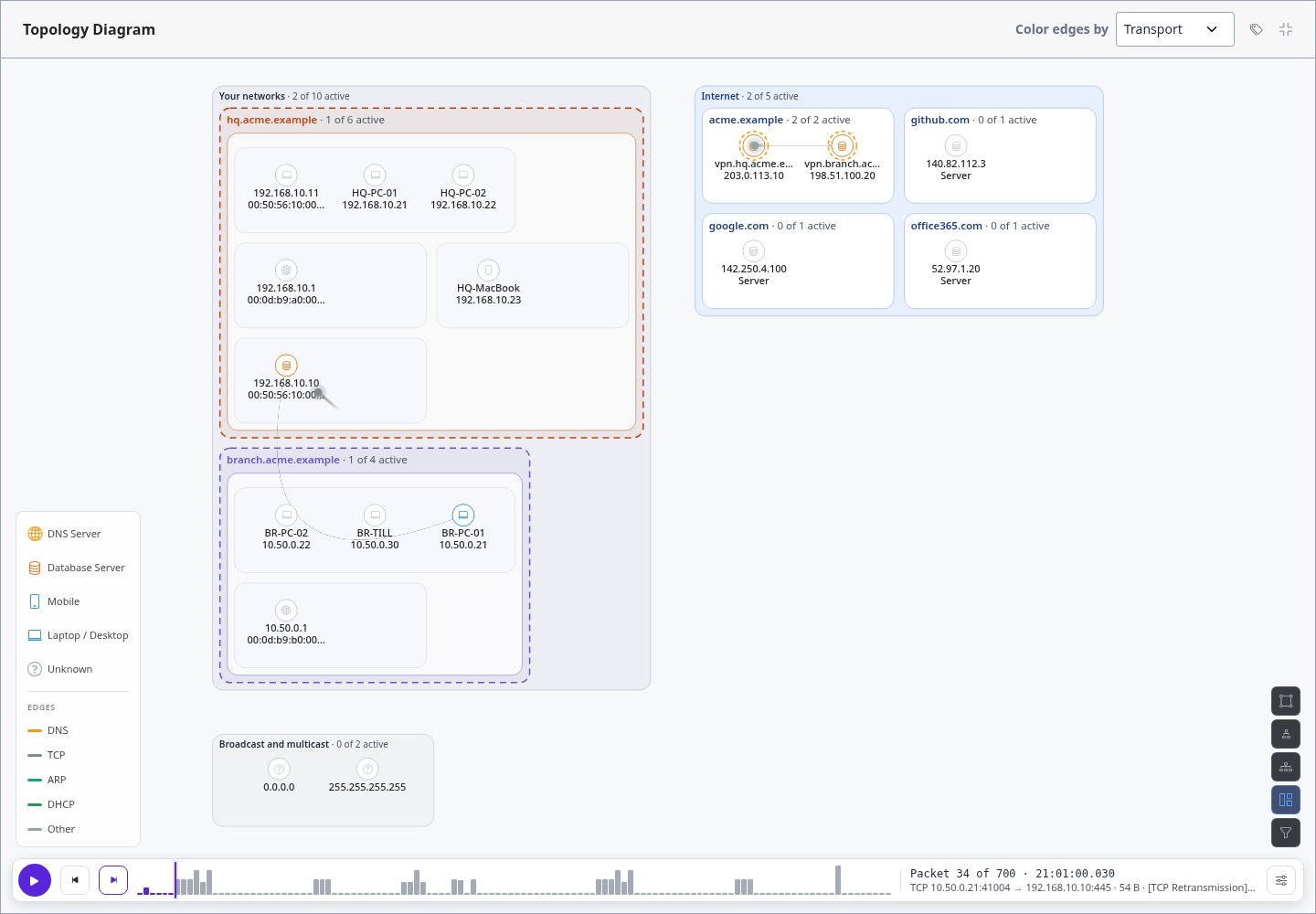
site_to_site_vpn.pcap: a Branch PC opens a connection to the HQ file server through the
tunnel.
Moments
Replay steps by moment: every packet captured within the same millisecond. A broadcast, a multicast answered by several hosts, or a burst sent at once plays as one step, all its packets flying together; the next step is the next instant anything happened, however long the gap.
The Replay Bar
Play steps through moments on its own; Speed in the settings sets how many moments a second (1, 2, 5, 10 or 25).
Previous and Next step one moment by hand.
The chart shows the capture’s traffic, with a playhead at the current moment: click or drag to jump there. From the keyboard it’s a slider: arrows step a moment (Shift: ten), Home and End jump to the start and end.
The readout gives the packet numbers, the time to the millisecond, and what the packet is, from the dissector:
TCP 10.50.0.21:41004 →
192.168.10.10:445 · 54 B · [SYN] …
, or for several at once3 packets at once: DNS ×2, ARP. Packets whose conversation is filtered off the graph are counted (2 not on the graph) but don’t fly.
While replaying, the graph shows the current instant: the conversations open at that moment are drawn and the rest are greyed out, as with a very narrow time window. Nodes appear when first seen works here too, so stepping from the start grows the network packet by packet, and in the Network Map Layout each box counts its active devices.
Limits
Replay reads the packets TracePcap stored at analysis. With
PACKET_RETENTION_HOURS set (see Environment Variables),
a capture’s packets are pruned after that long to save space while its
conversations stay; replay isn’t available for it then, and the bar says so.