STRRAT infection — “You dirty rat!”
Note
Captured against TracePcap v0.1.1 (dev, 17 October 2026). TracePcap changes quickly, so
this walkthrough is a point-in-time record. The deterministic conclusions — victim, signed-in user,
malware, and command-and-control — are stable across versions; screenshots, exact packet and host
counts, and UI details reflect that build, and a later one may differ. Re-verify against the
current build before quoting a specific figure.
This walkthrough runs a real, publicly available network-forensics incident through TracePcap’s existing features, end to end. It works the way an analyst would: from the captured traffic alone, with no prior knowledge of the network, and cross-checks every result against the exercise’s own official answer key.
Note
Nearly everything here comes from TracePcap’s deterministic layers — Suricata, nDPI, the host classifier, the Kerberos/LDAP identity extractor, and the knowledge layer that folds them into one graded investigation. The LLM “Story mode” narrative comes last, grounded in those findings rather than being their source. That distinction is the point of the demo: the ground truth is deterministic, graded, and reproducible.
The exercise
malware-traffic-analysis.net publishes real malware traffic as training exercises: a packet capture from a realistic, simulated corporate infection, a short scenario prompt, and an answer key. Analysts download the capture and practice incident response from network data alone.
The scenario here is the 2024-07-30 “You dirty rat!” exercise. The title is a pun — the malware is a RAT (Remote Access Trojan), specifically STRRAT, a Java-based commodity RAT that provides remote control, keylogging, and credential theft. It was delivered as an email attachment, so the loader itself is out of band; the capture contains only the post-infection network traffic — which is exactly the black-box situation TracePcap is built for.
What you are given
The exercise hands the analyst the environment and the task, and nothing else — everything else has to be recovered from the capture.
Scenario briefing (the simulated corporate LAN):
Given |
Value |
|---|---|
LAN subnet |
|
Active Directory domain |
|
Domain controller |
|
The task |
Identify the infected host and its details (IP, MAC, hostname, the logged-in user), the malware family, and the command-and-control server — i.e. write the incident report. |
The capture itself is not committed to this repository. Third-party incident archives can carry live malware samples, so they stay out of git by policy. Download it from the source instead:
Page: https://www.malware-traffic-analysis.net/2024/07/30/index.html
The capture ZIP is password-protected. malware-traffic-analysis.net uses a fixed scheme,
infected_YYYYMMDDwhere the date is the post date — so this one isinfected_20240730.
Everything below is what TracePcap recovers, starting from just that briefing and the .pcap.
Walking it through TracePcap
Step 1 — Upload and analyse
Upload the .pcap through the normal upload flow. A single
deterministic pipeline runs on ingest — packet dissection, nDPI application identification, Suricata
(Emerging Threats ruleset), host classification, and the Kerberos/LDAP identity extraction — and a
knowledge layer assembles the results into a graded investigation.
No LLM is involved in any of it. When analysis completes, every view below is populated.
Step 2 — Overview: the shape of the capture
The Overview tab is the landing summary: 11,562 packets across 47 hosts and 426 conversations, the protocol mix, the applications nDPI identified, and a row of risk-alert badges. Two protocols worth noting immediately are KRB5 (Kerberos) and LDAP — the directory-service traffic that will name the victim.
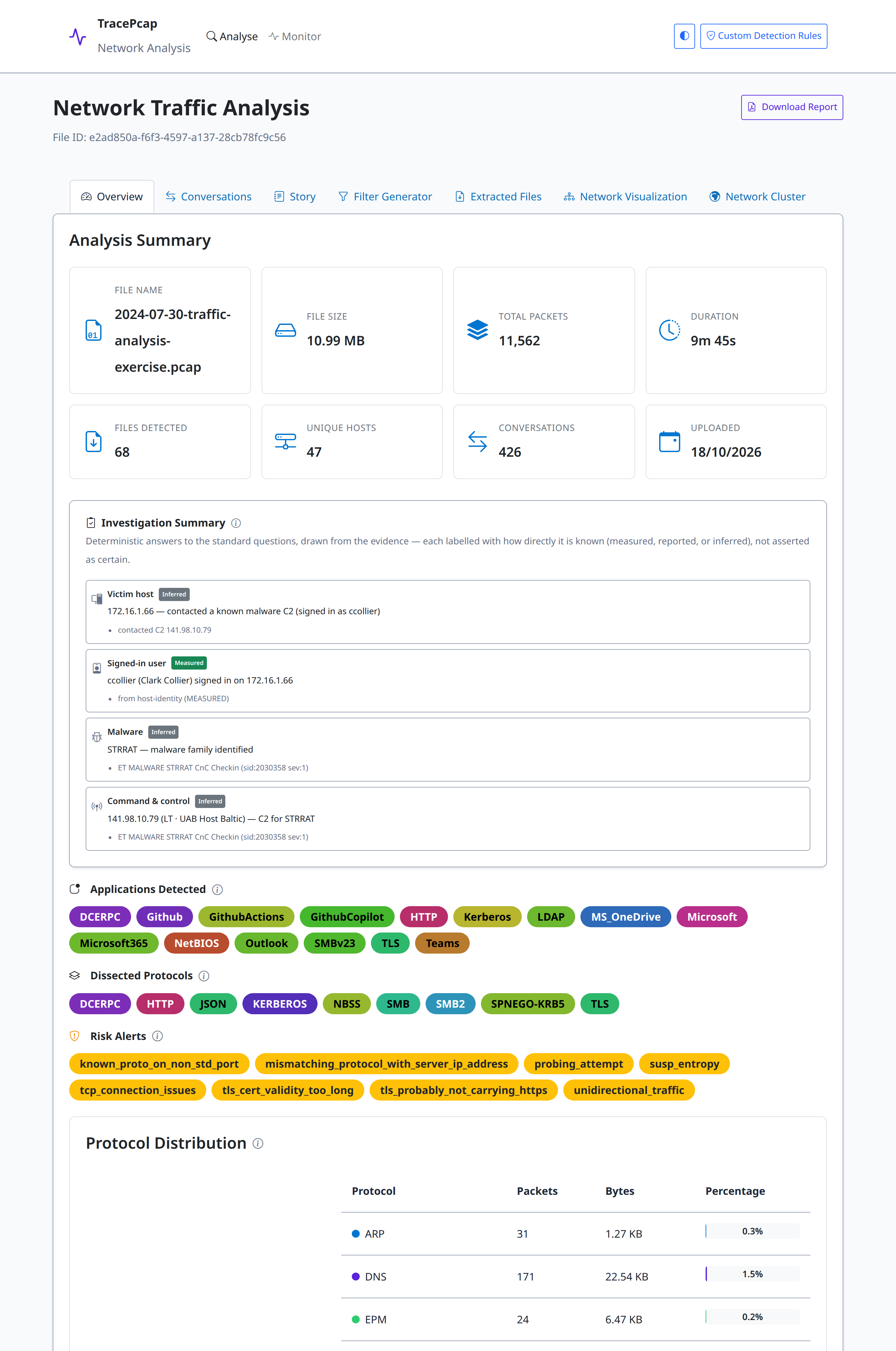
The Overview tab: inventory, the Investigation Summary (covered next), protocol distribution (note KRB5 and LDAP), detected applications, and nDPI risk alerts.
Step 3 — The investigation summary: the incident report, answered
Before touching a single packet, the Investigation Summary (on the Overview and Story tabs) already
answers the exercise’s questions. It is produced by deterministic checks that read the assembled
knowledge board — not the LLM — and each answer carries a grade recording how directly it is known:
MEASURED (the traffic itself exhibited it), REPORTED (a party asserted it on the wire), or
INFERRED (a tool or heuristic judged it).
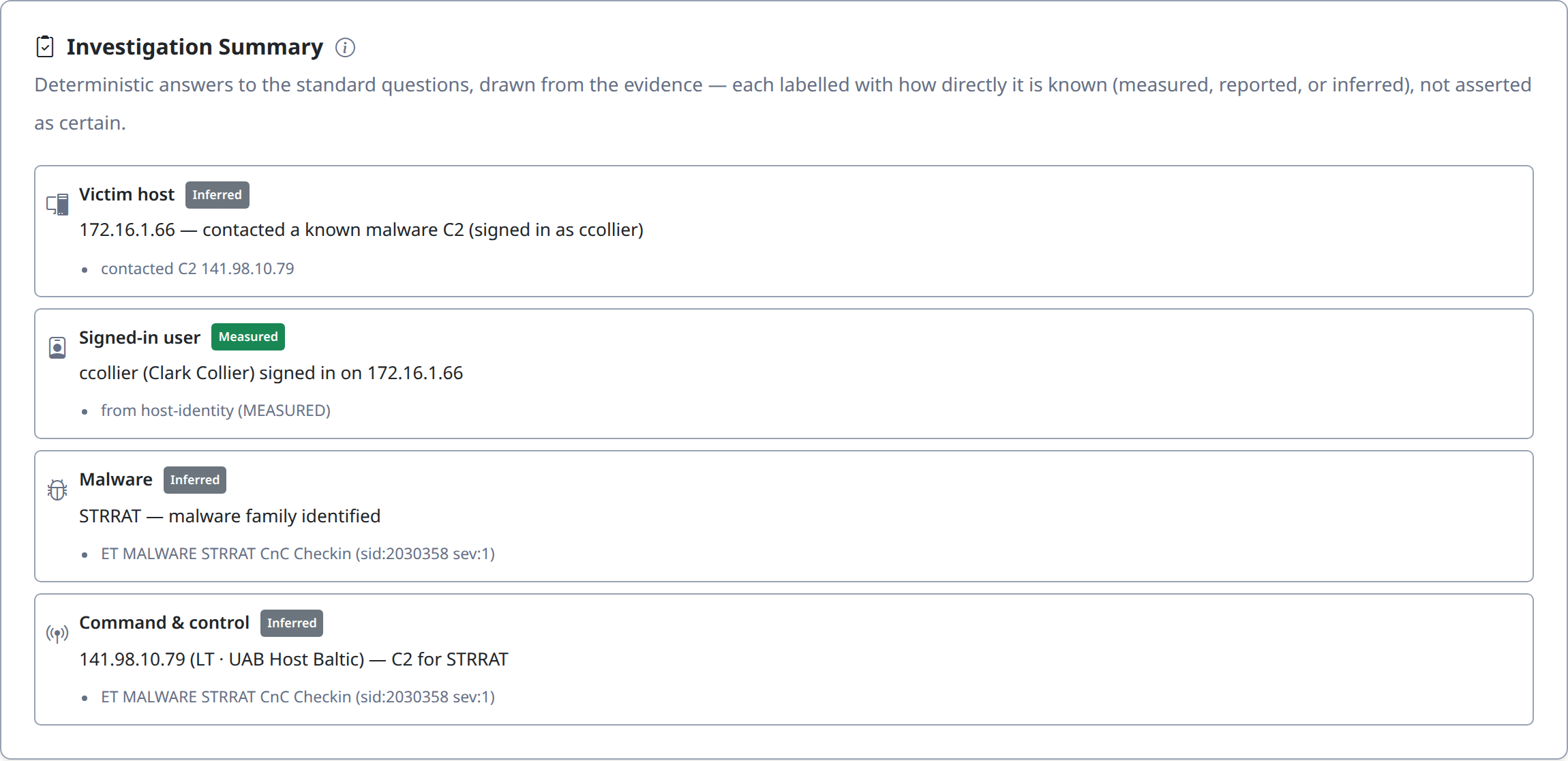
The Investigation Summary on the Overview tab. Each standing question is answered and badged with
its grade: the signed-in user ccollier is Measured (the host authenticated as it), while the
victim, the malware (STRRAT), and the C2 (141.98.10.79, LT · UAB Host Baltic) are
Inferred, each with the evidence it rests on.
Goal |
Answer |
Grade |
From |
|---|---|---|---|
Signed-in user |
|
MEASURED |
Kerberos AS-REQ + LDAP |
Victim host |
|
INFERRED |
contacted the C2 below |
Malware |
|
INFERRED |
IDS + stream fingerprint |
Command & control |
|
INFERRED |
IDS + beacon + GeoIP |
The summary names who, what, and where at a glance, and it is honest about certainty: the signed-in
user is MEASURED (the host authenticated as that principal), while the malware and C2 are
INFERRED (a signature and a protocol fingerprint judged them). The rest of this walkthrough is the
evidence beneath each of those answers.
It does not depend on the IDS being present
Re-run the same capture with Suricata switched off and the investigation still names STRRAT and
the C2. The host’s sustained, low-throughput, raw-TCP session to 141.98.10.79:12132 is flagged
as a beacon from its traffic shape alone, and following that stream recovers STRRAT’s cleartext
check-in (ping|STRRAT|…|ccollier|…). A conclusion in TracePcap is not held up by any single
library being installed.
Step 4 — Threat detection: the C2 conversation
TracePcap runs Suricata automatically, so the family is named without any manual pcap digging. In the
Conversations tab, filtering to the destination 141.98.10.79 leaves a single flow — and its IDS
Alerts column already carries the verdict:
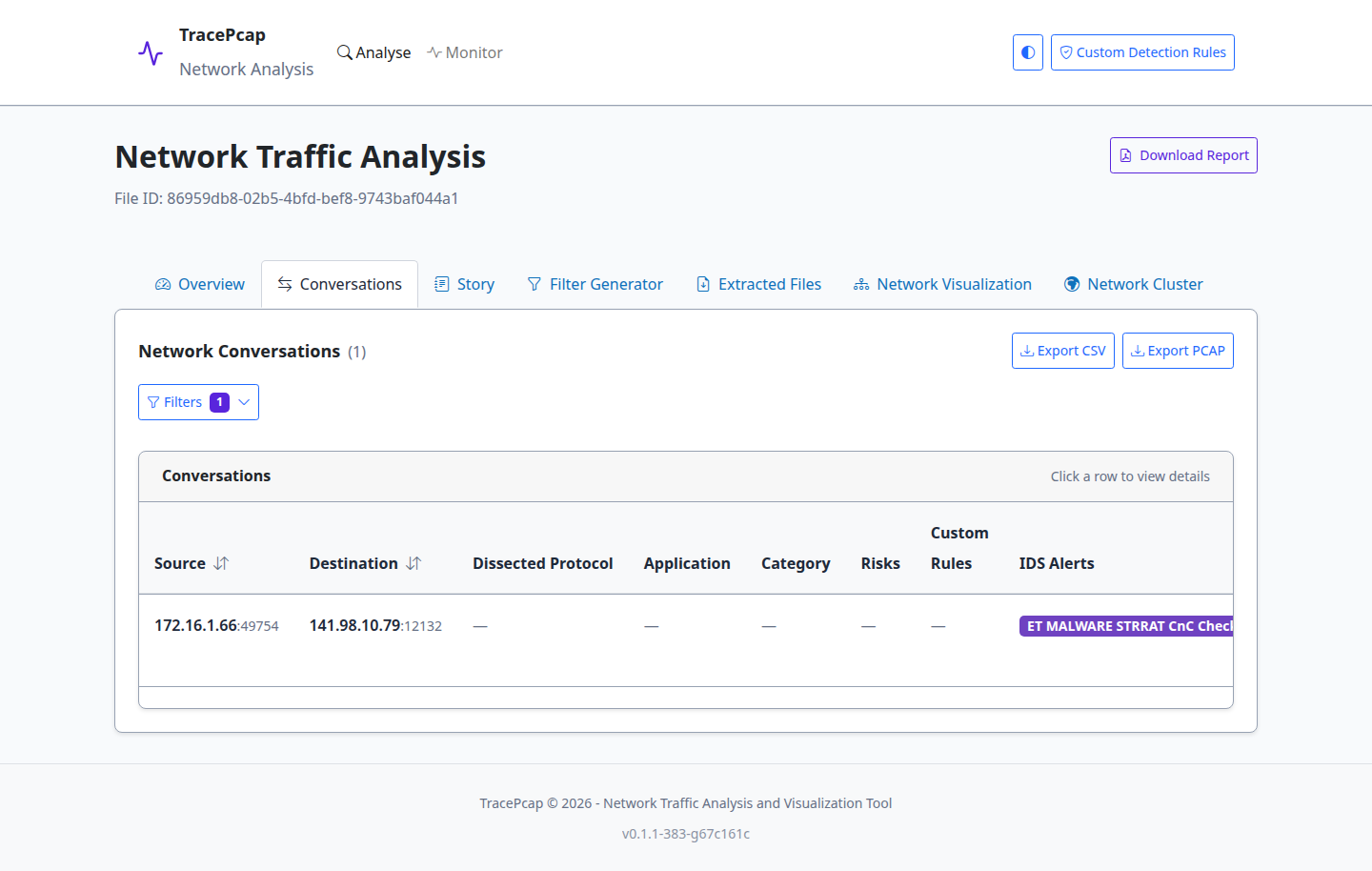
One conversation, 172.16.1.66:49754 → 141.98.10.79:12132, flagged “ET MALWARE STRRAT CnC
Checkin” (sid 2030358).
That single signature anchors the malware family (STRRAT), the C2 endpoint
(141.98.10.79:12132), and the infected host (172.16.1.66) — and it is the evidence behind the
INFERRED malware and C2 answers in the summary above.
Step 5 — Conversation detail: the full picture of the C2 channel
Opening that conversation shows both endpoints in context: the client 172.16.1.66 classified as a
laptop/desktop, the server as an external host, the Suricata security signal restated, and — via the
offline GeoIP database — the C2’s location.
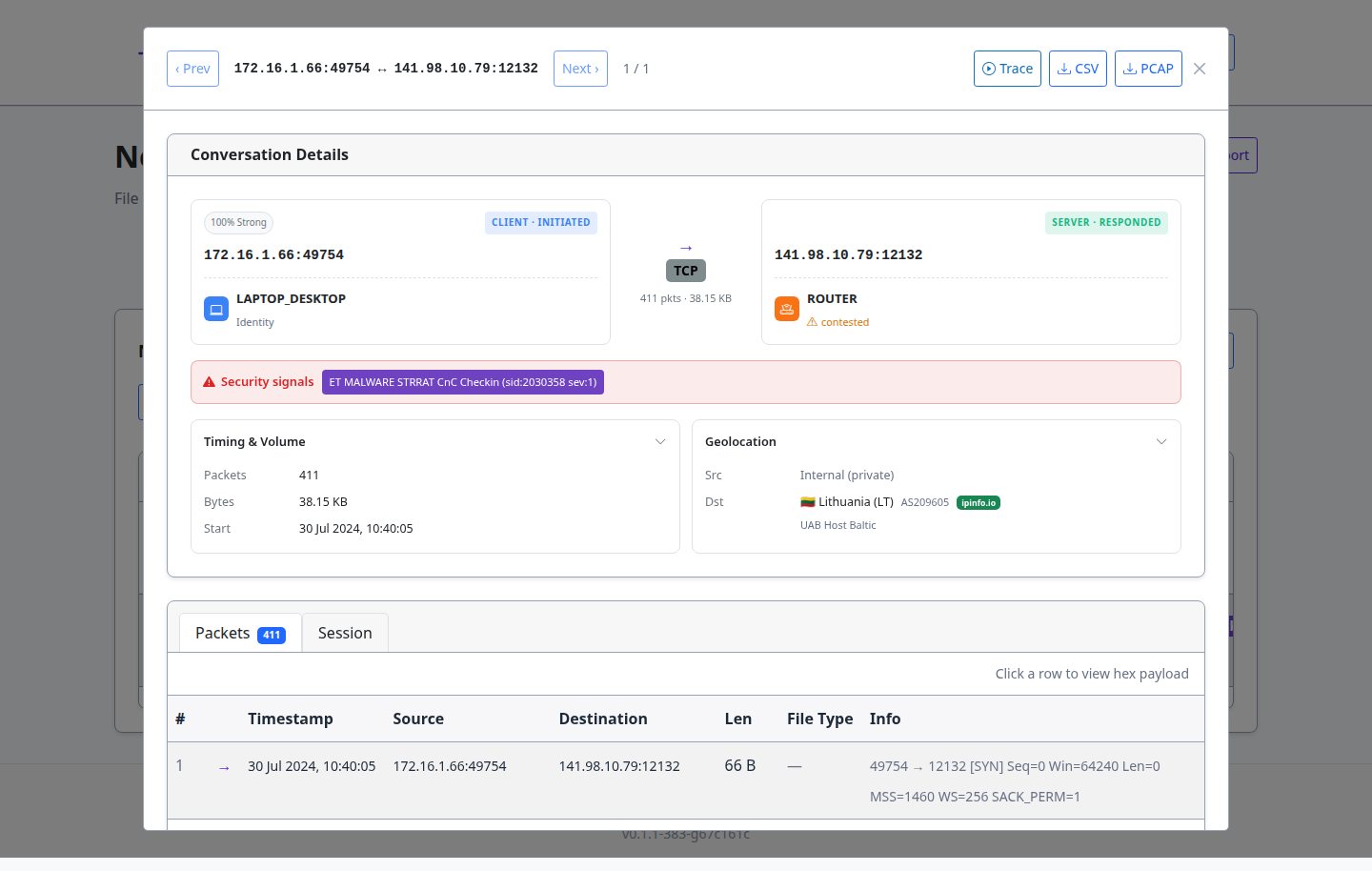
The C2 channel in full: the STRRAT security signal, GeoIP placing 141.98.10.79 in Lithuania
(UAB Host Baltic), and the raw packet list.
Step 6 — Host identity: recovering the person at the keyboard
Clicking the victim host opens its identity panel — the capability this demo motivated (see
Windows Sign-in Identity). The exercise’s own answer key recovers the user’s identity by
hand, filtering LDAP for a givenName attribute. TracePcap does it automatically: it reads the
client’s own Kerberos AS-REQ (ccollier authenticating) and the LDAP directory lookup of
that account (CN=Clark Collier,CN=Users,DC=…), and folds both into the host’s classification
evidence.
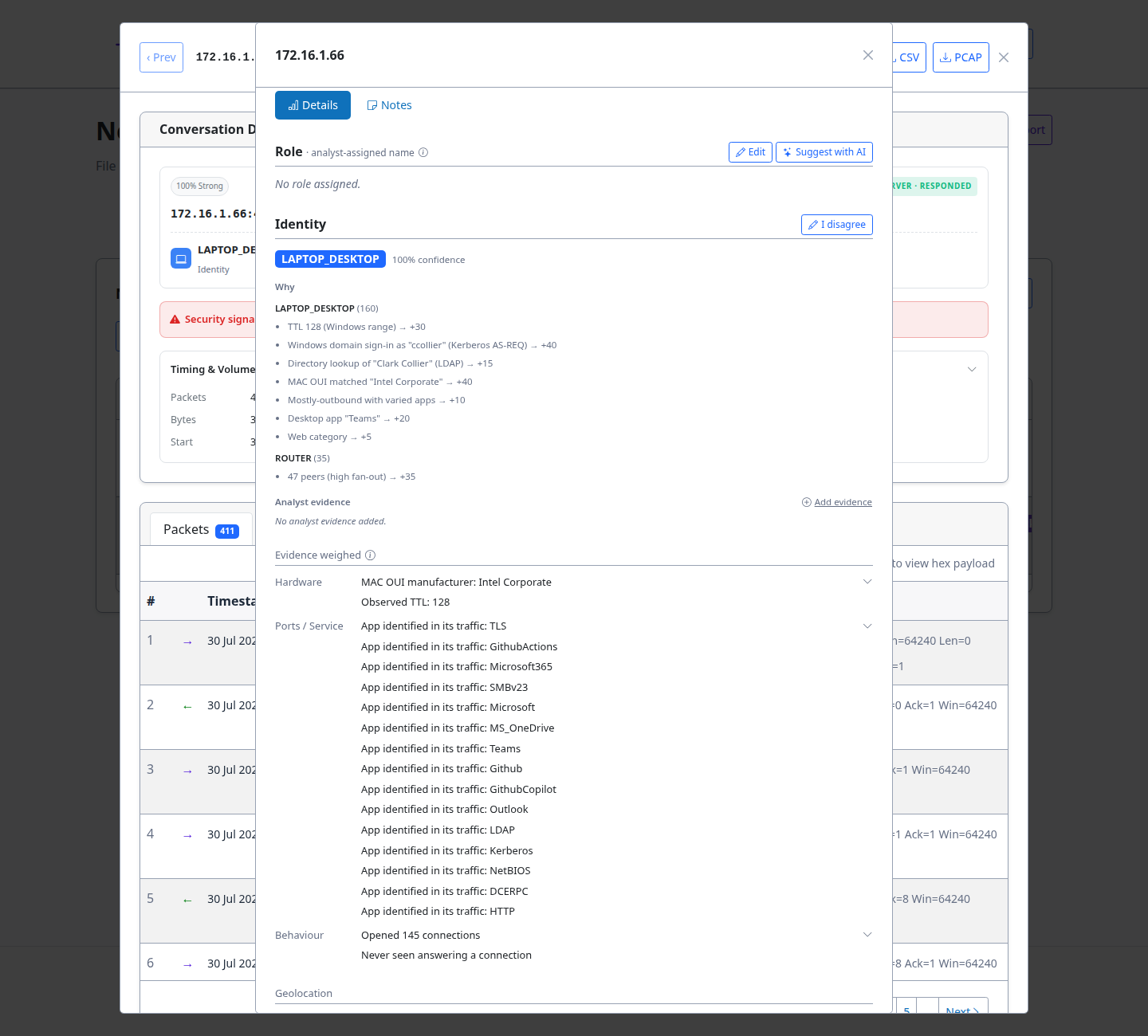
172.16.1.66 → LAPTOP_DESKTOP, with the Why breakdown naming the user: Windows domain
sign-in as “ccollier” (Kerberos AS-REQ) → +40 and Directory lookup of “Clark Collier” (LDAP)
→ +15.
The Kerberos claim is the stronger of the two — the client authenticated as that principal — so the
signed-in-user answer is graded MEASURED and weighs more than the LDAP directory lookup, which
merely names an account someone queried. The domain controller (172.16.1.4) is deliberately
not credited with a signed-in user, and machine accounts (DESKTOP-SKBR25F$) are excluded, so no
computer object is ever mistaken for a person.
Step 7 — Behaviour: the beacon, the top-talker, and an honest gap
Behavioural analysis adds shape to the picture, independent of any signature:
The C2 beacon, by shape alone. The host’s session to
141.98.10.79:12132is flagged as a suspected beacon purely from its traffic shape — a sustained, low-throughput, raw-TCP channel to an external host on a non-standard port, carried over hundreds of packets. This is the same endpoint the Suricata rule named, reached independently; it is what lets the investigation stand up with the IDS off.Not the domain controller. The host also exchanges perfectly regular NetBIOS keepalives with the DC (
172.16.1.4:139) — periodic to the millisecond. TracePcap deliberately does not call that a beacon: regular traffic to an internal service port is ordinary Windows behaviour, not command-and-control. (Flagging it was a real false positive; see issue #823.)Top-talker and fan-out.
172.16.1.66initiated 368 flows to 46 distinct destinations and produced 97.1% of all bytes in the capture.An honest visibility gap. 66.9% of conversations (285 of 426) could not be classified by nDPI — surfaced as a HIGH finding rather than pretending to full coverage.
Step 8 — Story mode: a grounded narrative
With a local LLM configured (see LLM Setup), Story mode writes a SOC-style narrative. It is built on the investigation above: the graded answers are handed to the model as ground truth it must name and must not contradict, and the prose cites the evidence beneath each one (the Suricata signature, the Kerberos sign-in, the beacon’s cleartext check-in). The model narrates and answers follow-up questions; it does not detect.
Important
Story mode is the one layer that needs the LLM, and it is deliberately last. Everything above —
the investigation summary, the signature hit, the recovered identity, the beacon — is produced by
the deterministic pipeline and stands on its own, offline and reproducible. The narrative’s job is
to make those findings readable, and each claim it makes is tagged with the grade of the finding it
rests on, so an INFERRED attribution is never dressed up as certainty.
Artifacts recovered
From one upload, with no prior knowledge of the network, TracePcap surfaced:
Question |
Answer |
How TracePcap found it |
|---|---|---|
Who? |
|
Kerberos AS-REQ + LDAP directory lookup (host identity) |
What? |
STRRAT (Java RAT) |
Suricata “ET MALWARE STRRAT CnC Checkin”; corroborated by the beacon’s cleartext check-in |
Where (C2)? |
|
Suricata signature + beaconing shape + offline GeoIP |
Which host? |
|
Host classification (TTL, OUI, apps, sign-in) |
How does it behave? |
A beacon to the C2 on |
Behavioural / beacon analysis |
Tip
A small cross-check worth noting: the exercise’s published answer key lists the C2 as
141.98.10.69, while the destination in the capture — and the address the ET STRRAT rule matches —
is 141.98.10.79. A one-digit transcription difference; TracePcap reports what is on the wire.
What this demonstrates
The most forensically valuable answers — who, what, where, and how it behaves — came from deterministic analysis, reproducibly and offline, from a single upload, and the investigation summary presents them already graded by how directly each is known. The Kerberos/LDAP identity extraction closes the one gap the exercise’s answer key had to fill by hand. The beaconing and stream analysis mean the C2 and the malware family are recovered even with the IDS turned off. And the LLM narrative, useful as a readable summary, is exactly that: a layer on top whose every claim is anchored to — and graded by — the deterministic evidence beneath it.