System Architecture (C4)
TracePcap’s containers, drawn with the C4 model: one box per Docker
container that docker compose runs, and the lines are how they talk. Click the diagram to open it
full size.
Note
C4’s “container” means anything that runs on its own, which strictly makes the React app (it runs in the browser) a container separate from the nginx that serves it. We draw them as one box on purpose, because they ship as one image, so the diagram matches what you deploy.
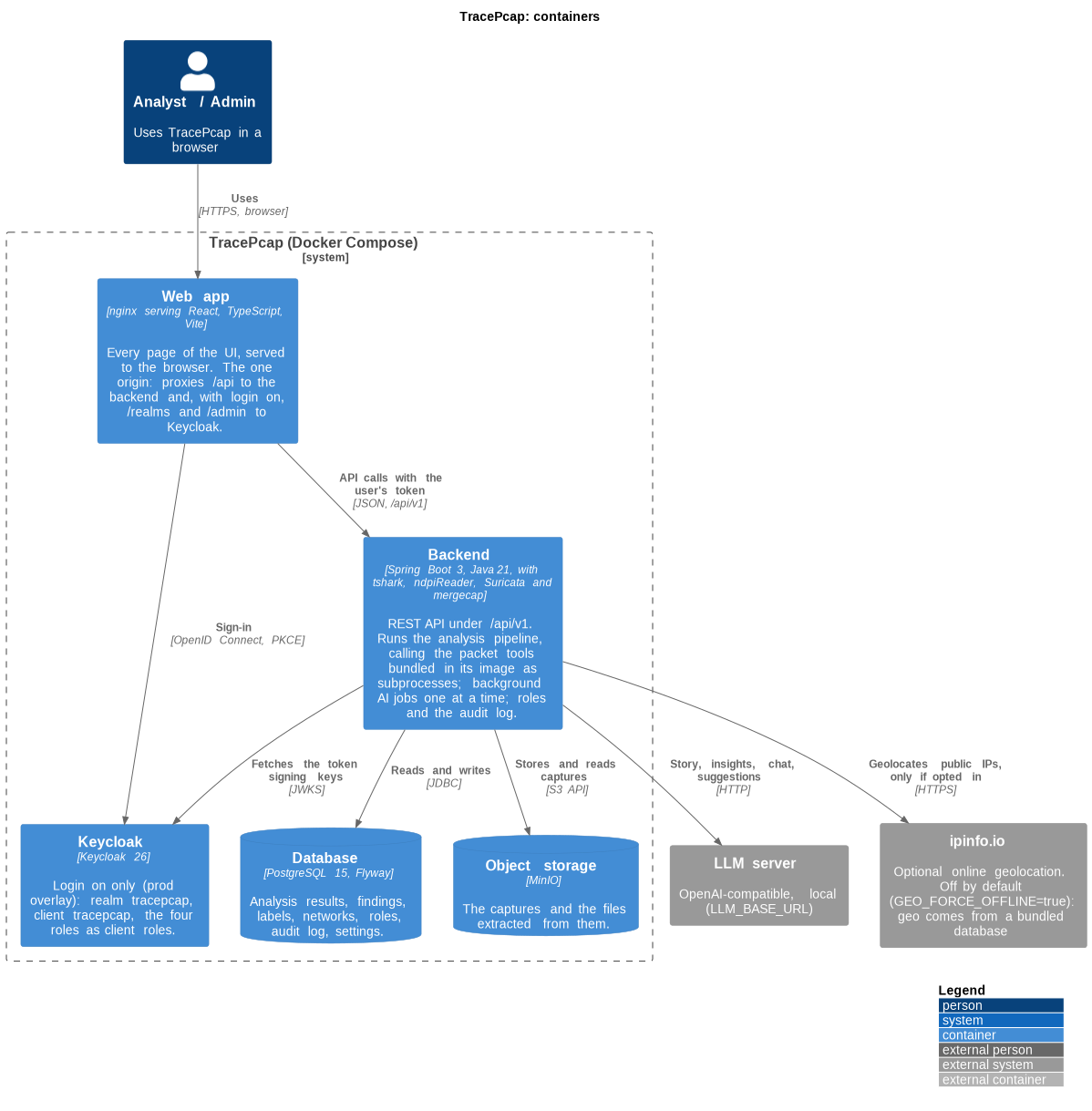
What docker compose runs. The base stack is docker-compose.yml; turning login on adds
Keycloak from docker-compose.prod.yml.
Container |
Technology |
What it does |
|---|---|---|
Web app |
nginx serving React, TypeScript, Vite |
The UI, built into the nginx image and run in the browser, calling |
Backend |
Spring Boot 3, Java 21 |
The REST API, the analysis pipeline, background AI jobs (one at a time for the model), roles and the audit log. Its image bundles the packet tools (tshark, ndpiReader, Suricata, mergecap), which it runs as subprocesses: they’re the only code that reads the capture itself. How the backend is organised inside is in The Five-Stage Pipeline. |
Database |
PostgreSQL 15, Flyway |
Analysis results, findings, labels, networks, roles, the audit log and settings. |
Object storage |
MinIO |
The captures, and the files extracted from them. |
Keycloak |
Keycloak 26 |
Login on only: realm |
docker-compose.yml also runs two one-shot helpers, minio-volume-perms and minio-init,
which prepare the storage volume and bucket and then exit. They’re left off the diagram.
Outside TracePcap
TracePcap runs fully offline; both outside systems are optional:
LLM server. A local, OpenAI-compatible inference server at
LLM_BASE_URLwrites stories and insights and answers questions. It’s sent findings, never raw packets. Without one, everything else works (see LLM Setup).ipinfo.io. Online geolocation, off by default in every stack (
GEO_FORCE_OFFLINE=true), so TracePcap never contacts it; a bundled DB-IP database answers instead. SetGEO_FORCE_OFFLINE=falseto opt in; it’s then used when reachable (see Geolocation & Device Classification).
Keycloak can also be outside: point TracePcap at your organisation’s own realm instead of the bundled one (see Authentication (OIDC / Keycloak)).
Editing the diagram
The source is docs/architecture/c4/container.puml, with the rendered SVG committed next to it:
# after editing a .puml
scripts/render-diagrams.sh
The script runs a pinned PlantUML image in Docker (no Java needed) with networking off. CI runs
scripts/render-diagrams.sh --check and fails if a committed SVG doesn’t match its source.
Two rules keep the diagram working offline and stable:
Include the C4 library from PlantUML itself,
!include <C4/C4_Container>, never!includeurl https://raw.githubusercontent.com/.... The library ships inside PlantUML; the URL form needs the internet to render and follows whatever upstream changes.No version number in the title. Git already versions the file; a hand-typed version goes stale.